///////////////////////////////////////////////////////////////////////////////////////////////
// Quartz Scheduler
///////////////////////////////////////////////////////////////////////////////////////////////
grant codeBase "file:${com.sun.aas.instanceRoot}/applications/j2ee-modules/QuartzScheduler/-" {
permission java.lang.RuntimePermission "getClassLoader";
// Required for ShutdownHookPlugin
permission java.lang.RuntimePermission "shutdownHooks";
permission java.lang.reflect.ReflectPermission "suppressAccessChecks";
permission javax.management.MBeanPermission "com.sun.enterprise.admin.runtime.BaseRuntimeMBean#", "registerMBean";
permission javax.management.MBeanServerPermission "findMBeanServer";
};
Saturday, October 20, 2007
Quartz Job Scheduler on Glassfish
I have discovered that get a Quartz Job Scheduler to run in glassfish, you need to change the server.policy file to add the following information:


Thursday, August 02, 2007
Running Woodstock 4.1 on Apache Tomcat 6.x
This is part of a comment I posted previously, but I thought it might worth mentioning with some details
To get the components to work with Apache you will need to download the Sun JSF 1.2 RI and install it in the lib directory. You will also need the Java Standard Tag Library (JSTL) implementation. The Apache JSTL 1.1 implementation needs to be installed in the lib directory.
Once these libraries are installed, you may check that the Woodstock libraries will run by installing the Woodstock examples.
Once these steps are completed and you run the examples you should see this this page

To get the components to work with Apache you will need to download the Sun JSF 1.2 RI and install it in the lib directory. You will also need the Java Standard Tag Library (JSTL) implementation. The Apache JSTL 1.1 implementation needs to be installed in the lib directory.
Once these libraries are installed, you may check that the Woodstock libraries will run by installing the Woodstock examples.
Once these steps are completed and you run the examples you should see this this page

Monday, July 02, 2007
VWP (Woodstock) JSF MessageGroup Tip
It is funny how often we as programmers do things that later cause us extra work.
How many of you while developing a JSF Page use a MessageGroup to display debugging information? I bet your intent was to delete, or not to display (visibility/render) it later...
Here is a tip that will make your life easier....
1. In your web.xml file add an environment entry called displayMessageGroups like below.
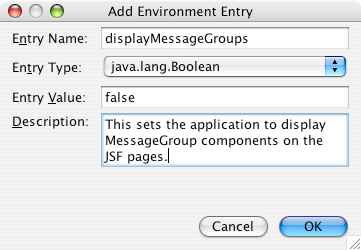
2. We will use this to inject a resource into our Application Bean to set it for the whole project.
3. Open the Application Bean (usually ApplicationBean1) and add the following:
NOTE: I am using auto-boxing on the Boolean --> boolean conversions.
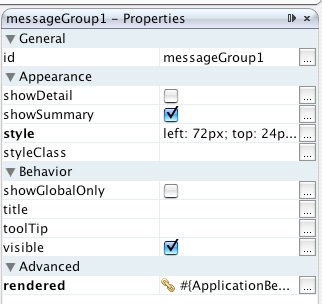
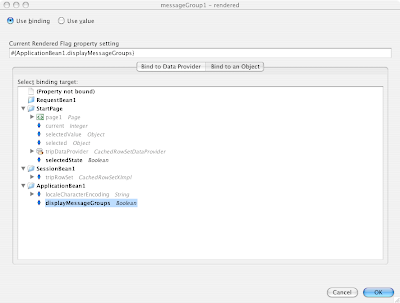
4. Now bind the component by using the properties for the MessageGroup components in your project.
NOTE: You will want to bind the render property and not the visible property. We do not want to add additional downloaded components to the page if we are not planning on using them. This is good style.
This will save you a lot of time later and make debugging easier if you need it.
How many of you while developing a JSF Page use a MessageGroup to display debugging information? I bet your intent was to delete, or not to display (visibility/render) it later...
Here is a tip that will make your life easier....
1. In your web.xml file add an environment entry called displayMessageGroups like below.

2. We will use this to inject a resource into our Application Bean to set it for the whole project.
3. Open the Application Bean (usually ApplicationBean1) and add the following:
@Resource(name = "displayMessageGroups")This will allow us to change the value from true/false by simply changing the web.xml file if we need to turn on the messages for debugging.
private boolean displayMessageGroups;
public boolean isDisplayMessageGroups() {
return displayMessageGroups;
}
NOTE: I am using auto-boxing on the Boolean --> boolean conversions.
4. Now bind the component by using the properties for the MessageGroup components in your project.
NOTE: You will want to bind the render property and not the visible property. We do not want to add additional downloaded components to the page if we are not planning on using them. This is good style.


This will save you a lot of time later and make debugging easier if you need it.
Subscribe to:
Posts
(
Atom
)
