Showing posts with label Mojarra. Show all posts

Thursday, November 16, 2017

JSF 2.3 Tip of the Day: Single Select Menu Item Example

One of my new colleagues is new to JSF development, and asked for some assistance in creating a JSF <h:selectOneMenu/> which had a blank option. I came up with a quick example using JSF 2.3 and CDI on GlassFish 5.0.

The web page (index.xhtml) looks like the following:

The backing bean (IndexBean.java) contains the list of items for the menu and the logic to hold the selected value:


All in all a very simple example. I was asked what my dependencies looked like so here is the one last piece.


The NetBeans Maven project can be downloaded here: jsf23-cdi-selectonemenu-example

Thursday, March 24, 2016

JSF 2.2 Tip of the Day: Using Hibernate Validators with JSF

Introduction

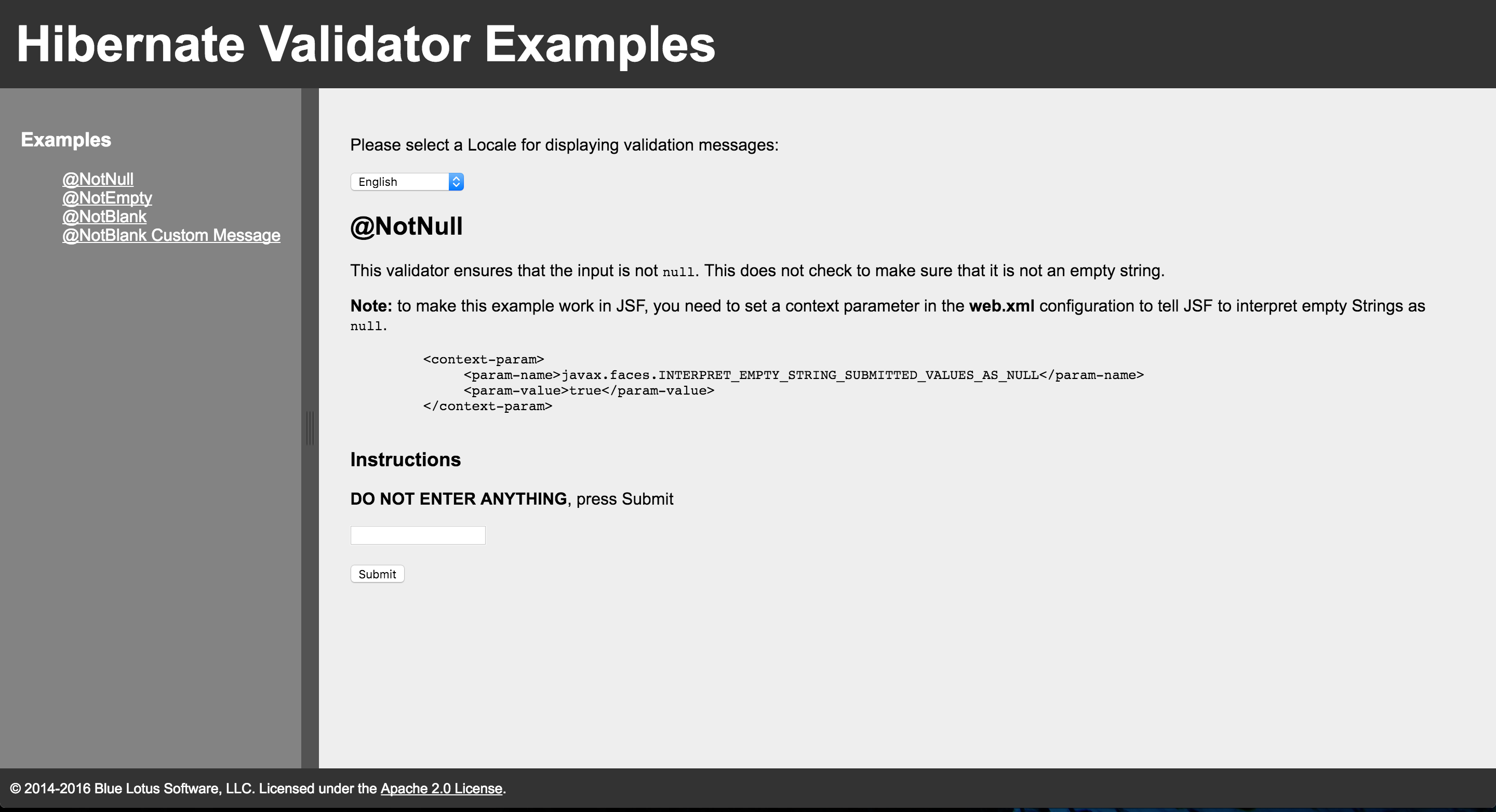
Hibernate validators offer a plethora of validators to make your development work much easier. Some of the common ones that are used are @NotNull, @NotBlank, and @NotEmpty. To take advantage of these validators, and avoid some misconceptions, a little information needs to be provided.

@NotNull

Everyone likes this particular annotation, and it can be a real life saver. However something that often catches developers using it on JSF is that JSF treats empty form fields as empty strings. This is not the same as null. So if you want JSF to capture these values and treat them as null values, you need to tell JSF to do so. This is accomplished by adding the following context parameter to the web.xml file.
    <context-param>
         <param-name>javax.faces.INTERPRET_EMPTY_STRING_SUBMITTED_VALUES_AS_NULL</param-name>
         <param-value>true</param-value>
    </context-param>
Once this is added to the context, all blanks will be treated as null values. Be mindful of any side effects created from this change.

@NotEmpty

This validator causes a lot of confusion. The value can not be null, but can be any character including whitespace, e.g. You can enter a space, and it will accept it.

@NotEmpty

This is the most useful annotation from my standpoint. This makes sure that the input is not null, and is not an empty string like white spaces. This is really what I think most developers are really after anyway. They want to make sure that users fill in form fields.

Code

The code for this project can be found on Github, and includes some additional bonus code such as using locales, and custom messages. The code can be found here: jsf-hibernate-validator.


Tuesday, March 22, 2016

JSF 2.2 Tip of the Day: Using ValueExpressions and VariableMapper to set EL using a PhaseListener

The title seems like a mouthful, and it is. I had some code which I used to demonstrate how to set EL values using a PhaseListener. I was going to delete the code when I decided that it was the second time someone in a short span of time asked me the same question, and I should post how to do it.

The use of a PhaseListener to set EL values seems to the casual observer like Voodoo magic. You will see the EL expressions on the page, and they magically seem to populate. In some ways it is like a classical interceptor which can make your code really seem magical, and lead to confusion. This approach though has its place, and if used correctly can solve a lot of issues. One example is determining if a <ui:include src="XXX" rendered="#{EL_VARIABLE_HERE}" /> should render.

It can also be used to set the src value on the fly. An always popular question on how to resolve.

The project can be found on GitHub here: jsf-ve-phaselistener

So the output looks like a nice set of name value pairs using the Greek alphabet as variable names.


Wednesday, April 01, 2015

JSF 2.2 Tip of the Day: p:passthrough and How to use it

I was asking my team to go through their JSF pages, and to update the XML namespaces to use the latest namespace from the JSF 2.2 specification. While I was looking at the code, I found a number of instances where developers were adding attributes like name to <h:commandButton /> and NetBeans correctly was identifying that there is an issue with that.

Fortunately, some of these attributes were passing through to the underlying page without needing p:passthrough. However, you should not rely on such functionality to work. If the VDL Document does not show it as an attribute, you shouldn't expect it to work.

Alright, so how do we do it correctly?

There is no magic here. It is simply a matter of adding the attribute with a prefix of p:, for example p:name="someName" for the name attribute. This will result in the attribute being passed through the rendered and added to the resulting output.

So I have an example, and the resulting output.

The resulting output will run the JavaScript associated with the passed through attributes, or set the CSS styling. Very simple and easy to implement.

Tuesday, February 17, 2015

JSF 2.x Tip of the Day: Implementing a ViewMapListener

A map of the lands where the Trobadors flourished. 
"France 1154-en" by Reigen - Own work
Licensed under CC BY-SA 4.0 via Wikimedia Commons.

Introduction

There are a number of SystemEvents supported by JSF 2.x. A question that comes up frequently is how to implement them. In a number of cases on stackoverflow, it is implemented using a PhaseListener. I was looking for a way to cleanup the view map, or just get values from it before it was destroyed. I decided that the simplest way to do so was to implement a ViewMapListener. I also noticed that there were very few posts on how to implement it using the faces-config.xml so I decided to use that approach since it was instructive and more clear to me.

Implementation

The basic implementation requires that you add our listener implementation to the faces-config.xml. The example I have here is designed to get called on a PreDestroyViewMapEvent which is called on a normal navigation. We can force it though by adding a @PreDestroy annotation to a method to invoke before being destroyed. Inside the method we would need to get the UIViewroot view map, and call clear(). This would cause our listener to be invoked too. It would be a good cleanup mechanism for cleaning up resources on session expiration too, but at the moment this does not work on JSF 2.1. The @PreDestroy is not called on session timeout on JSF 2.1. This is expected to be an enhancement in JSF 2.2+.

The code for the project can be downloaded from Bitbuket here: viewmaplistener-example

Conclusion

The example above is just one mechanism of using a SystemEvent listener. You may decide to read values from the map, and add them to the session, or manipulate it in some other way before the data is destroyed.

Sunday, December 21, 2014

JSF 2.x Dynamic Encoding

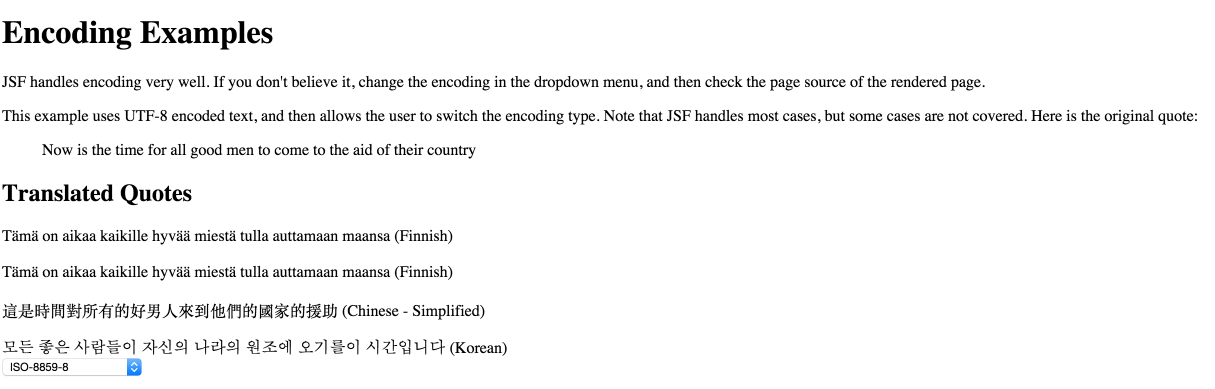
Encoding Examples
In an Internationalized world, we need to be able to change the encoding of a JSF page dynamically. In this case, we have some characters encoded in UTF-8, but we want to be able to change the encoding on the page, and have the framework handle the character conversions for our web page.

So how do we do it?

One of the simplest ways is to wrap our page in a <f:view /> tag. The tag wraps the <head/> and <body/> elements in our HTML page. In the example above this is accomplished as shown below: The code for the backing bean is shown below:

EncodingBean.java


The Netbeans Maven project can be found here: JSF Dynamic Encoding

Tuesday, August 19, 2014

JSF 2.1 Tip of the Day: Clearing the @ViewScope

Introduction

I was trying to solve an issue in our code where the @ViewScope beans were not being garbage collected. I spoke a number of times with Manfred Riem at Oracle about the weirdness of this issue. The issue simply put was that we were facing a memory leak where the instances of @ViewScope objects were not being removed from the view map. As a result, the pages were being kept in memory. The view map is limited to 32 views which helped to hide the issue. In most cases, it would not appear to normal users of our application. The issue was suddenly evident when the view contained tens of thousands of objects. 32 x 10k is REALLY BIG! It really never made it to 32, the system would stall and crash at about 6 instances.

The Culprit

We had implemented our own custom NavigationHandler. This was working quite well on JSF 2.0.x, but a couple of things happened. The JSF implementation was changed to handle another view scope issue, and our implementation of the NavigationHandler was changed from my original code. The new handler did not handle cleaning up the @ViewScope object view map which is stored in the session. Oh, yeah, the view map in the session was the change to the API too.

The Solution

The solution turned out to be something simple, re-implement the same mechanism in the default NavigationHandler to clear the @ViewScope objects from the view map in the session.

Interesting Observations

I was trying to come up with a mechanism to clear the view map data from the session, and came up with a SystemEventListener to test out some ideas. I thought I would share the code for people to see how the map is cleared. This is an approach to the issue, but as I noted, it was actually something missed in our NavigationHandler. I thought I should post the code for anyone who was looking for ideas on how to manipulate the map, or clear data in it. So without further hesitation. Here is the code.

ViewMapSystemEventListener.java


To implement the listener, you need to add an entry to the faces-config.xml file as shown below.

faces-config.xml


Monday, June 16, 2014

Clickjacking and Java EE: Some Practical Solutions

©Technology Personalized

Introduction

What is Clickjacking?

Clickjacking, also known as a "UI redress attack", is when an attacker uses multiple transparent or opaque layers to trick a user into clicking on a button or link on another page when they were intending to click on the the top level page. Thus, the attacker is "hijacking" clicks meant for their page and routing them to other another page, most likely owned by another application, domain, or both.
Using a similar technique, keystrokes can also be hijacked. With a carefully crafted combination of stylesheets, iframes, and text boxes, a user can be led to believe they are typing in the password to their email or bank account, but are instead typing into an invisible frame controlled by the attacker.

What does this mean for Java EE developers?
 
We don't operate inside of a vacuum. HTML/JS technologies are the backbone of most EE applications. This makes them subject to this kind of attack just like any other HTML/JS technologies. In fact, we often abstract away a lot of the underlying HTML/JS from the developer, this can make us more susceptible to this kind of attack unless we are cognizant and diligent in applying defenses.

Fortunately, there are a number of simple things that developers can do to add additional layers of security to their applications in an unobtrusive way. Those methods include adding X-Frame-Options, and frame busting.

X-Frame-Options

The first solution is to add a header to our pages to offer a browser a "suggestion" on how to handle pages that contain frames. The options include DENY, SAMEORIGIN, and ALLOWFROM. The latter is a new addition and may not be supported. The DENY option advises the browser not to allow any content to be displayed if it comes inside a frame. The SAMEORIGIN option advises the browser to only display framed content, if the content is coming from the same origin as the original request. The ALLOWFROM option takes a parameter (URI) that advises that content from a given URI can be framed. As previously noted, this may not be supported on all browsers. You will need to examine your target browser for compliance. Make no assumptions about your users though. They will use a browser of convenience. The implementation of adding the header is simple. The OWASP has come-up with a simple filter to handle the X-Frame-Options.

Frame Busting

The second solution is simple too. It involves using CSS/JS to do something called "frame busting". There are a number of examples on the web. I would recommend that you examine them carefully. I have found that the code I use is simple, elegant, and does not leave a lot of room for attack vectors. This does not imply that it is invulnerable, but does provide a good defense.

In the frame busting method I use, the CSS sets the style attribute body{display:none !important;} on the <body /> tag of the page as soon as the page is loaded. This is followed by a JS function that checks to see if the page is inside a <frame />, if it is then it attempts to set the body as the top location. Thus it breaks the frame. If it is successful, it removes the body{display:none !important;}styling. Otherwise, the <body /> of page will not display. Simple.

Examples

I have created a NetBeans Maven project on Bitbucketclickjacking-examples

The examples include comments and instructions to see the various issues, and possible solutions. Examples include HTML, JSF, and JSP pages. These examples were developed on GlassFish and tested on Apache Tomcat. The code for frame busting is included below for reference using JSF.

Frame Busting Code


References

Thursday, June 12, 2014

JSF 2.2 Tip of the Day: Hidden Field Validation

Hidden Mines

Introduction

How often do you have validators on your hidden fields? I recently performed a security audit of an application that did not have validators associated with the hidden fields on the page. I suspect that the out of sight, out of mind mentality prevailed. Admittedly, I have often short circuited some development and put hidden fields in a JSF page without a validator. My expectation is that the data in the field would be used to provide information that may be needed by the application. However, if these fields have setters... and the results are stored in a database... I think you get the picture.

Methodology

I decided to create a more complex than really necessary example to show how to validate a <h:inputHidden /> field. In the example, you can enter names into an <h:inputText /> which will use JavaScript to update the hidden field. The validation will be activated on form submission. Additionally, a value change listener will update the planet name, and update the planet to the new planet. The validation will prevent putting in planets that don't exist in the enum for current Planets. You can confirm this by entering a bogus name, or poor Pluto that was kicked out of the planetary club.

Code

The code for this example was developed using NetBeans 8.0 IDE on GlassFish 4+ and Apache Tomcat 8+ using JSF 2.2 (Mojarra).

The code for the project can be downloaded from Bitbuckethidden-field-validation


Planets.java


PlanetValidator.java


IndexBean.java


index.xhtml


Thursday, May 01, 2014

JSF 2.2 Tip of the Day: JavaScript Popup Window with Dynamic URL Link

Introduction

There are times when you need to have a JavaScript popup window that opens to another URL based on user input.  The JavaScript is usually added to the onclick event on the JSF component. The dynamic link in JSF is more difficult to accomplish since binding the onclick using Expression Language (EL) is determined at page rendering time. As a result, this means that the JavaScript is not dynamic. As a result, the link is not dynamic either.

A Solution

I have created a project that has three examples that demonstrate the different types of JSF links including the dynamic link. The last example includes <f:param /> elements that are appended to the dynamic URL that is generated.

The dynamic example still uses the onclick event, but the JSF action performs a redirect of the newly opened window. Additionally, and of the parameters that are added to the JSF component are converted to query parameters and appended to the redirect URL.

The Apache Maven project created with NetBeans is located on BitBucket here: jsf-link-examples

The project was tested on GlassFish 4 using Mojarra  JSF 2.2, but the technique should work on other application servers and JSF 2.x versions.

Index.xhtml


IndexBean.java


Monday, April 28, 2014

Arquillian Graphene 2: JavaScript Unit Testing Examples

I have been doing work with Arquillian for a while. If you need to do integration and unit testing on your JSF application. This is definitely the path to take. It makes testing so much easier to accomplish.

Recently, I have been trying to use Arquillian Graphene 2 to do JavaScript unit testing. I spent a lot of time trying to get the examples on the Graphene 2 - JavaScript Interface wiki to work. I discovered that they were slightly incorrect and the source of my grief. One of the great things about an Open Source world is that I updated the wiki with the correct information.

I have created a couple of Proof of Concept (POC) projects to demonstrate how to use Graphene to do JS testing. The first example uses Graphene in stand-alone mode. This mode allows you to test your JavaScript outside of a container, but using a browser implementation like: PhantomJS, Chrome, Firefox, or Safari.

The Apache Maven NetBeans 8.0 project can be downloaded from Bitbucket here: graphene-js-poc

You will need to execute this from the command line, or use the JS Unit Test custom goal in NetBeans.


The next project is simply a combination of the code from the Arquillian Graphene 2 wiki combined into a more complex project. This project is designed to run in a container. In my case, Glassfish is the container of choice. The slickness of this approach becomes quite apparent when you see the application server start-up, execute the tests, and shutdown gracefully.

The Apache Maven NetBeans 8.0 project can be downloaded from Bitbucket here: graphene-poc.

The project includes a JSF example along with testing JavaScript.

If you need to do unit testing of your JavaScript, this may be an option to consider. Please make sure you read the wiki and understand the limitations of the approach however. You can use my code as an example to help guide you along the path.

Friday, April 18, 2014

JSF 2.2 Tip of the Day: Naughty Expression Language (EL)

Unexpected Effects

Many of you may know this already, but I was reminded the other day how this can catch even some of the most brilliant JSF developers. When you comment out a component in your xhtml page that has EL bindings, you may not be REALLY disabling it.
Expression Language (EL) is parsed and evaluated as the page is being rendered. As a result, any exposed EL syntax will be processed including functions which could have deleterious effects. For example, take a look at the following code, and guess what it will do.

So what happens?

Scary things happen....
  1. It executes
  2. Parser exception. The parser will try to find a property called doSomething
  3. It will execute, please note that there is no <h:form/>. It is not required since we are evaluating the EL.
  4. Parser exception. The parser will try to find a property called doSomethingElse

Sensei what do I do?

You have a couple of options. The first option is the easiest, and it is likely what you want anyway with your JSF pages. You can disable the comments. No need to transmit your development comments to the end users anyway. The second option is to add a - between the # and the { like this #-{indexBean.doSomethingElse()}.
The first option is handled by adding a configuration parameter to the web.xmlfile as shown below. Here is a more complete example: The result of the code is as follows:

The complete code example was developed using NetBeans 8.0 and GlassFish 4.0 on JDK 8. The code can be found here: auto-execute-el

Wednesday, February 12, 2014

JSF 2.2 Tip of the Day: Using JSF AJAX Events

Please wait...

Introduction

The JSF framework provides an easy to use AJAX event handling mechanism. The jsf.js library is included in Mojarra and MyFaces. There are two particular methods of interest: jsf.ajax.addOnError(callback) and jsf.ajax.addOnEvent(callback). I will be covering the latter handler.

The JsDoc does not really explain the jsf.ajax.addOnEvent(callback) code very well. Since it is Javascript, you can read it, but I think a simple example of its flexibility with some comments might work better.

Using the addOnEvent is very simple. You register the callback, and it gets called during the lifecycle. The important thing here to remember is that the callback must be a function. Otherwise, it will throw an error. You can control what event processing occurs during the lifecycle.

Events

The callback is invoked during the AJAX request and response lifecycle. The status passed to the callback are listed below.

Event Description
begin This is the start of the AJAX request.
complete This is invoked right after AJAX response is returned.
success This is invoked right after successful processing of AJAX response and update of HTML DOM.


Based on the status, we can take appropriate action on the AJAX event. A great example to demonstrate AJAX event handling is to provide feedback to the user to indicate the status of their request. I will demonstrate how to create an AJAX based progress loader to demonstrate the events.

Code

The code for our AJAX loader is very simple, and could be moved into a composite component if necessary. The NetBeans developed Maven project can be downloaded from the references section below.

index.xhtml


This code controls our progress bar by making changes to the CSS in DOM. The CSS idea is not mine, but it is clever. Here is the CSS.

loader.css


A simple CSS layout, and our Javascript callback to jsf.ajax.addOnEvent(callback) is all it takes to make a cool progress loader.

References

Monday, January 20, 2014

RichFaces 4.3.x Tip of the Day: Complex RichFaces Data Tables

Introduction

I have been working on JSF tables for the various projects I have been involved with over the years. Starting in 2012, I began looking at RichFaces <rich:dataTable /> for some projects at my day job. The research into how to handle a number of complex situations has been enlightening to say the least.

The table is the most complex component in HTML. It is seemingly boundless in its extensibility. You can have multi-column headers that span multiple rows, you can multi-row cells, or multi-column cells. Tables can be displayed left-to-right, or right-to-left, top-to-bottom and vice-versa. As a result, when developing components for JSF, or any component framework, decisions must be made on how to generate them.

A couple of the component frameworks like PrimeFaces, and RichFaces allow developers to create more complex tables with more ease. However there are limitations with each of these frameworks. We trade flexibility for consistency, and this is fine in most cases.

The demonstration code in this post is about getting some of the flexibility back, or taking advantage of the flexibility that comes with a framework like RichFaces. We will gain the flexibility back, but it is a function of complexity. The examples will show you techniques for doing the "same thing" in multiple ways. For example, sorting can be done on the server, client, or a combination of both.

The question is where we put the complex bits. The answer to that question depends on you as a developer. You need to examine the problem domain, and understand the limits to the techniques presented.

Solutions

Please let me confess something. I like building HTML objects programmatically. There I said it. In this case I am trading the ease of development for flexibility. The solutions below will demonstrate the different techniques for accomplishing the same functionality. Please examine the code carefully before discounting it. I spent a lot of time playing with it to make it look simple.

The code for this project was developed using NetBeans and Apache Maven. The code was tested on GlassFish 3.1.2.2 and 4.0. It should work on other application servers, but I have not tested it on other servers. This project assumes you are using NetBeans which includes a sample database that these examples require. If you are not using NetBeans, you will need to create your own database with sample data to display some of the tables.

The code can be downloaded from Bitbucket at the link below, or in the references section at the end of the post.

richfaces-tables-poc

Dynamic Data Table with Sorting
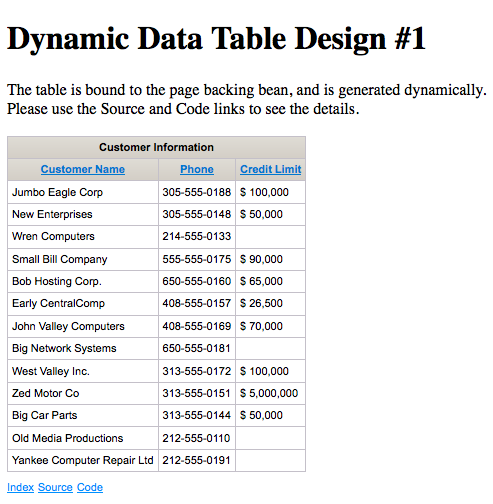
Dynamic Table with Sorting
This example uses the binding attribute of the <rich:dataTable /> to bind our table to a CDI @ManagedBean. The bean is responsible for generating the table programmatically, and returning it back to the page. The data is sortable by column.
As you can see the page is very simple. In fact, most of the page is plumbing and navigation. The <rich:dataTable /> is the smallest part of the page. The code to generate the table is much more complex.
As you can see we have traded simplicity in the page for complexity in the @ManagedBean. If you are satisfied with this technique, lets take a look at another one.

Dynamic Data Table with Sorting Revisited
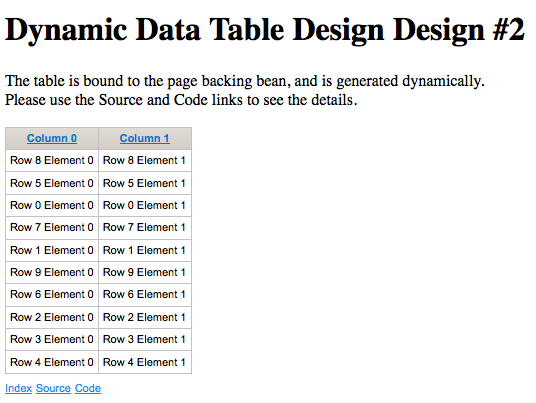
Dynamic Table
This table uses the same dynamic binding as the example above on the JSF page, but uses helper utilities to create JSF components dynamically from a library that I have written. It is a separate project that you can download (Please see references). This reduces the chances for errors creating common components, but it is still a lot of code. To check our sorting, I have made a "random" data generator for the table data for the code to sort.
The more simplified code in the @ManagedBean is shown below.
The code above was written before I added more functionality to my jsf-utils project. The new methods would shorten this considerably, but it would still be fairly complex.

Dynamic Table using JSP/JSTL Tags with JSF
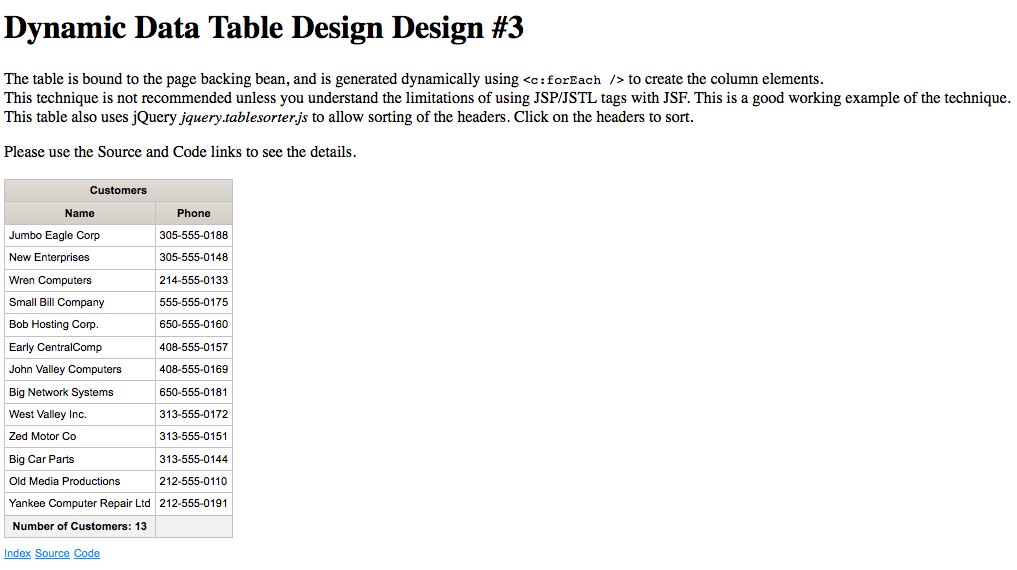
JSF/JSTL Dynamic Table
Let me start this example with a warning. If you are using JSP/JSTL tags in your JSF pages, you may encounter very bad behavior. This technique should only be used as a last resort. I will not labor a point. If you don't understand why this is a bad idea, take a look at this post for links: JSF 2.x Tip of the Day: Great Blog Posts Explaining JSTL vs. JSF.
In this example, I will generate the rows and columns using <c:forEach />. This transfers a lot of the complexity to the page and away from the @ManagedBean. Since we are using <c:forEach />, our mechanism for sorting has to change. I used Query jquery.tablesorter.js to allow sorting of the headers.
As you can see we have much simpler code in the page bean. It looks like what you would expect for a normal JSF data table.

Complex Data Table Design
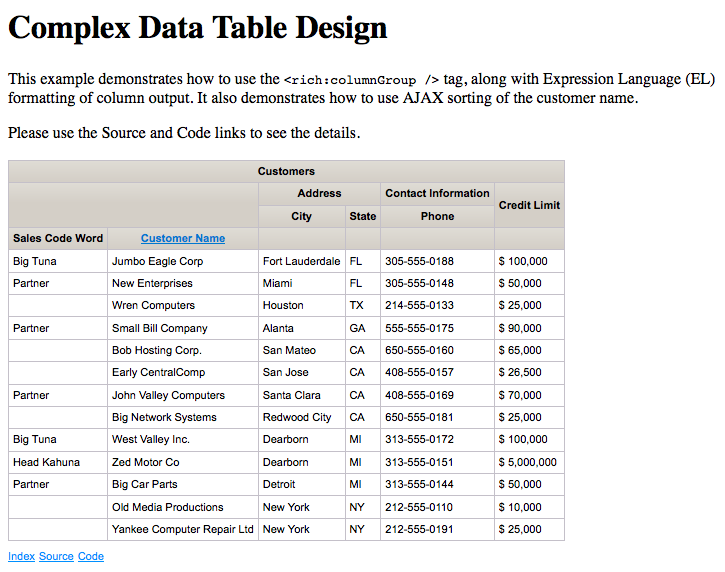
Complex Table Design
This table has a lot of really cool features, but the code is complex in the page, and the page bean is relatively simple.

Conclusion

RichFaces supports complex table designs, and produces nice results. The amount of work required to create dynamic data tables depends on the technique chosen, and limitations on the data being presented. There is no "one good way" to create data tables. Suffice to say that the easiest path should be chosen.

References

Popular Posts