I was looking at some JSP pages which contained a bunch of JSP script and JSP Expression Languange (EL) tags. The question was how to disable either both, EL, or scripting. Here is the solution.
You need to add, or change the configuration in your web.xml file. There are two ways configuration parameters which control scripting and EL.
<jsp-config>
<!-- Set to true to disable JSP scriptiing syntax -->
<jsp-property-group>
<url-pattern>*.jsp</url-pattern>
<scripting-invalid>false</scripting-invalid>
</jsp-property-group>
<!-- Set to true to disable Expression Language (EL) syntax -->
<jsp-property-group>
<url-pattern>*.jsp</url-pattern>
<el-ignored>false</el-ignored>
</jsp-property-group>
</jsp-config>
The lines above control how the page is translated. They are both currently set to
false.
Here is an example of a jsp page with both scripting and EL.
 1 <%@page contentType="text/html"%>
 2 <%@page pageEncoding="UTF-8"%>
 3 <%@ page import="java.util.Date" %>
 4
 5 <jsp:useBean id="now" scope="request"  class="java.util.Date"/>
 6
 7 <!DOCTYPE HTML PUBLIC "-//W3C//DTD HTML 4.01 Transitional//EN"
 8 "http://www.w3.org/TR/html4/loose.dtd">
 9 <html>
10     <head>
11         <meta http-equiv="Content-Type" content="text/html; charset=UTF-8">
12         <title>JSP Configuration</title>
13     </head>
14     <body>
15         <h1>JSP Configuration</h1>
16         <p>
17             Browser MIME types: ${header.accept}
18         </p>
19         <p>
20             Browser Compression: ${header["accept-encoding"]}
21         </p>
22         <p>
23             The context-path initParam is: ${initParam.customerServiceEmail}
24         </p>
25
26         <p>
27             HTTP Request Method: ${pageContext.request.method}<br>
28             HTTP Response Type: ${pageContext.response.contentType}<br>
29             HTTP Session ID: ${pageContext.session.id}<br>
30             HTTP Context Path: ${pageContext.servletContext.contextPath}
31         </p>
32         <p>
33             Date (script): <%= new Date()%><br>
34             Date(EL): ${now}
35         </p>
36     </body>
37 </html>
38
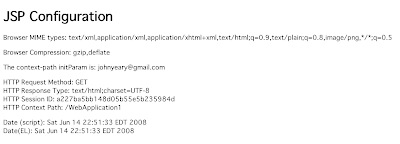
The resulting output looks like this:
After setting <scripting-invalid>true</scripting-invalid> The page will
throw an exception is there are any JSP scripting elements on the page.

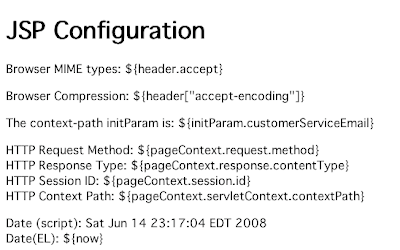
I went back and set the value back to false and set the <el-ignored>false</el-ignored>
This causes the container to treat the EL syntax as literal text.
The result is what you would expect. The only values diaplayed are JSP script.
The question is why would you want to go through the effort... If you were doing work on JSP pages
prior to JSP 2.0, you may have used some syntax similar to EL which you may not want
to have translated.
Turning off scripting forces the developer to use Java Standard Tag Libraries (JSTL)
and Expression Language (EL). This ensures a cleaner separation of code from
presentation in the MVC paradigm.


